

Why background transfers, durable queues, and exactly-once promises are really questions about ownership and evidence.
The progress bar reaches 100%. The app says Uploaded.
An inspector films a cracked foundation wall in a basement with one bar of signal. She taps Save, watches the bar reach 100%, locks her iPhone, and drives to the next site.
That evening she opens the same inspection on her iPad. The photos are there. The video is not.
The networking code did exactly what it was asked to do.
The product did not.
In Edition #15, a user started uploading a large video and switched tabs. We gave that upload an owner that outlives the screen and handed the transport to a background URLSession. Two owners, two lifetimes, both explicit.
This edition follows the upload to the end and asks the harder question:
When is the work actually done?
Swift in Practice is free and reader-supported. If it helps your work, you can buy me a coffee ☕.
One Tap, Six Different Facts
Back in the basement, a single tap on Save can set off six separate events:
- The file is safely written locally.
- A durable work item is committed to the local database.
- The server accepts bytes, perhaps in chunks.
- The server verifies the assembled object and its checksum.
- The server commits the attachment to the intended inspection record.
- The client observes that committed state and updates the UI.
These are not synonyms.
A 2xx for the last chunk is evidence that bytes arrived. It is not evidence that the attachment exists in the record.
Here is what went wrong. The progress bar hit 100% at step 3. The finalize request that drives step 5 ran on an ordinary session inside a completion callback, and iOS suspended the app moments after she locked the phone. The request never went out. Nothing on the next launch noticed.
Collapse six facts into one Boolean and the interface will eventually lie. Hers said Uploaded two steps early.
Model the State Machine Before the Transfer
Separate local safety, transfer progress, and remote commitment:
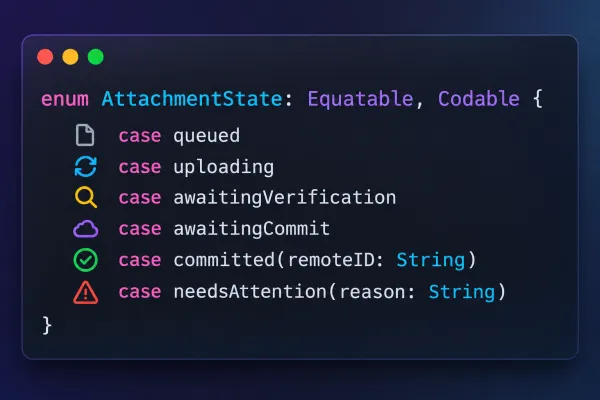
This is a conceptual model, not a persistence schema. In production, persist the attachment ID, the local file reference, the session task identifier, retry metadata, and the server version as separate fields.
A process can die between any two lines of code.
The next launch must rebuild the truth from durable records and server evidence, never from an in-memory enum.
The View Observes. It Does Not Own.
Edition #15 argued that navigation is not cancellation. Once the operation is durable, the view's job shrinks to one thing: subscribe to state.
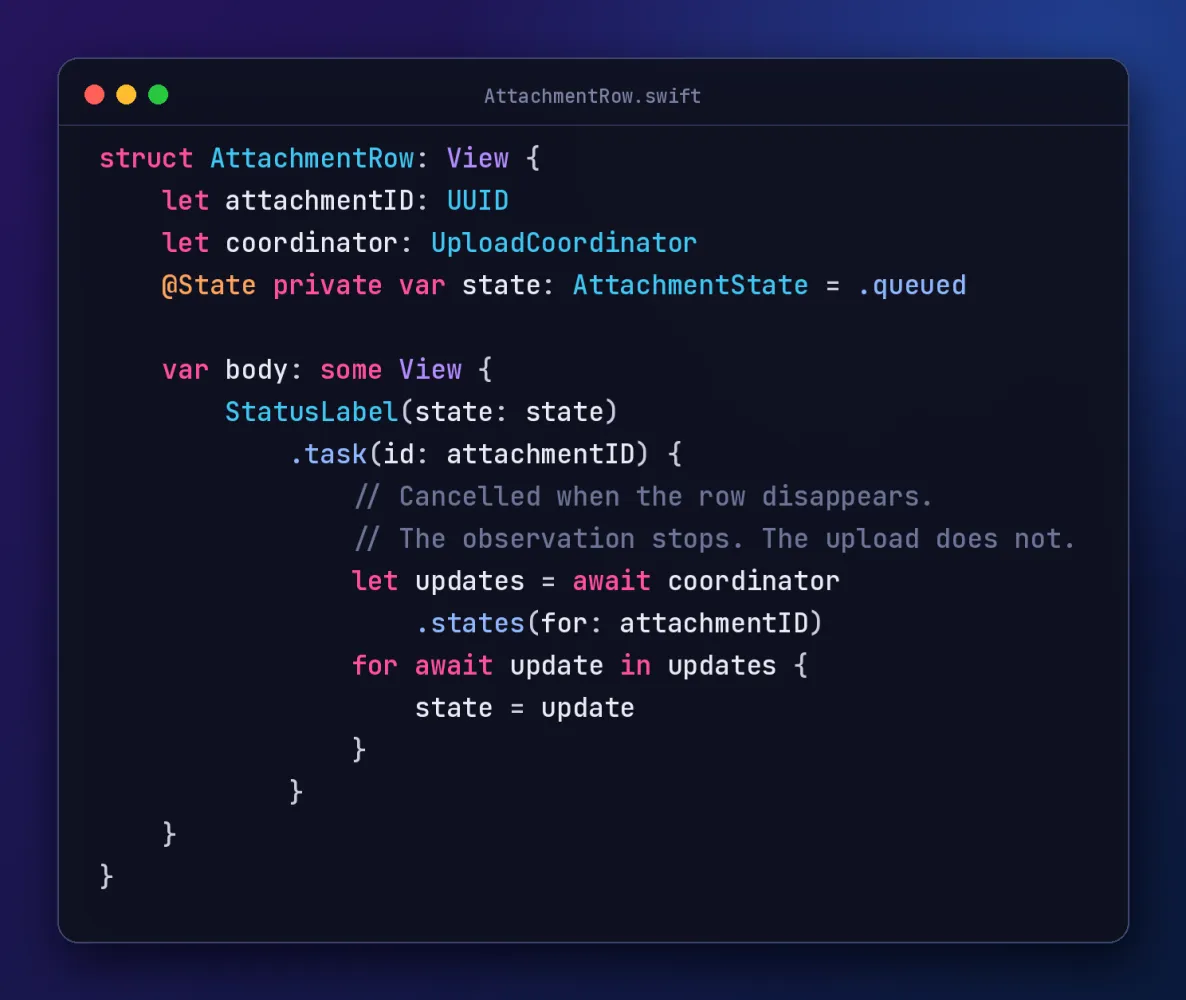
Edition #15 named two owners: the upload manager for the product view and the system for the transport. Durable work splits the first one in two and adds a final authority:
- The system owns the transport while the app is suspended.
- The coordinator owns scheduling and reconciliation.
- The ledger owns the recoverable record of intent.
- The server owns the only commitment that counts.
An actor can serialize access to the coordinator. It cannot survive termination, prevent duplicates across devices, or make a database write atomic with an HTTP request.
Background URLSession Is Transport, Not a Workflow Engine
A background session moves bytes while your app is suspended, and even after the system terminates it. It does not persist your intent, reconcile outcomes, or deduplicate retries. Three platform rules shape everything else:
- Uploads must come from a file. Background sessions accept uploadTask(with:fromFile:), not in-memory data or streams. Writing the file first is a requirement, not hygiene.
- Force-quit cancels. If the user swipes the app away, the system cancels its background transfers. Never promise unconditional execution.
- Scheduling is the system's call. Transfers started while the app is in the background may be deferred until power and network conditions improve. The UI must never imply immediacy.
So the order is non-negotiable: persist the file, persist the intent, then schedule the transfer.
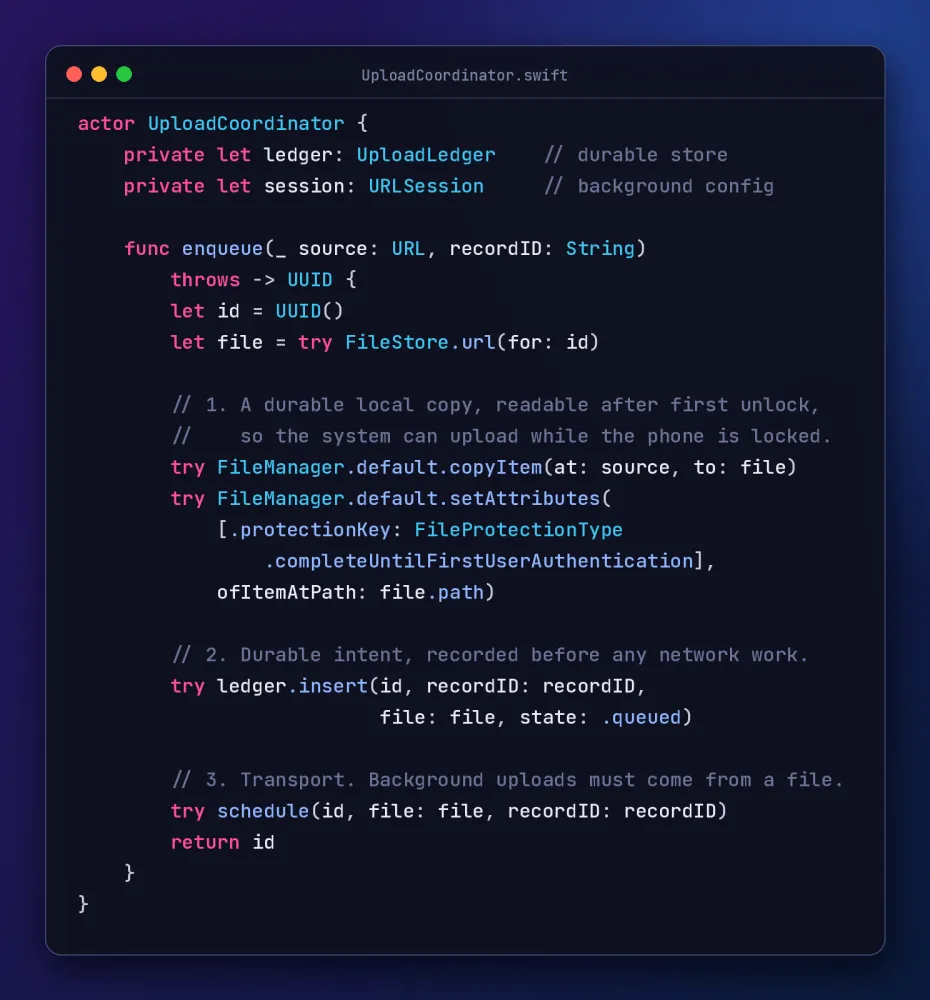
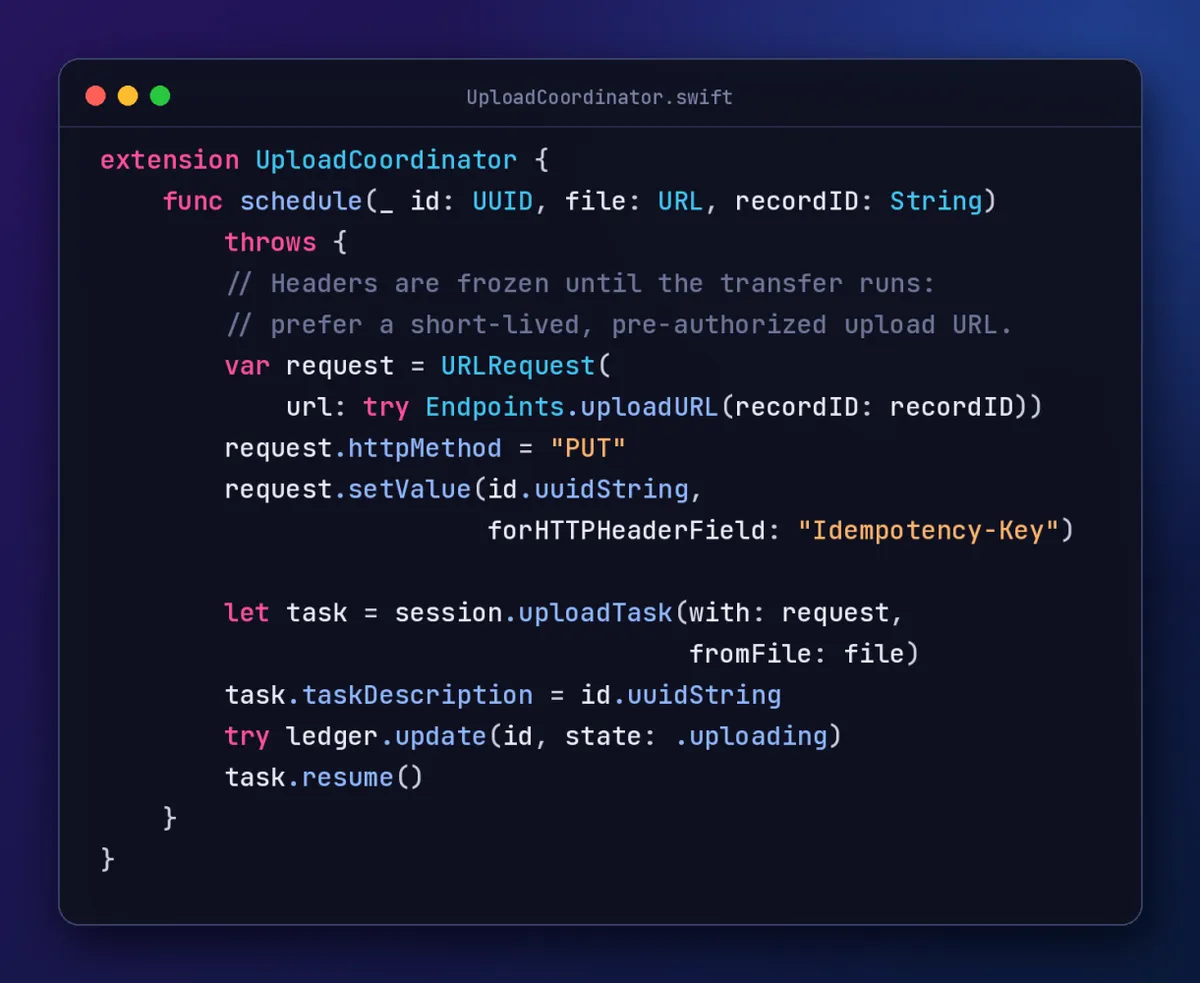
Then treat every delegate callback as an observation, not a verdict. It can arrive twice, late, out of order, or after a relaunch with no UI at all.
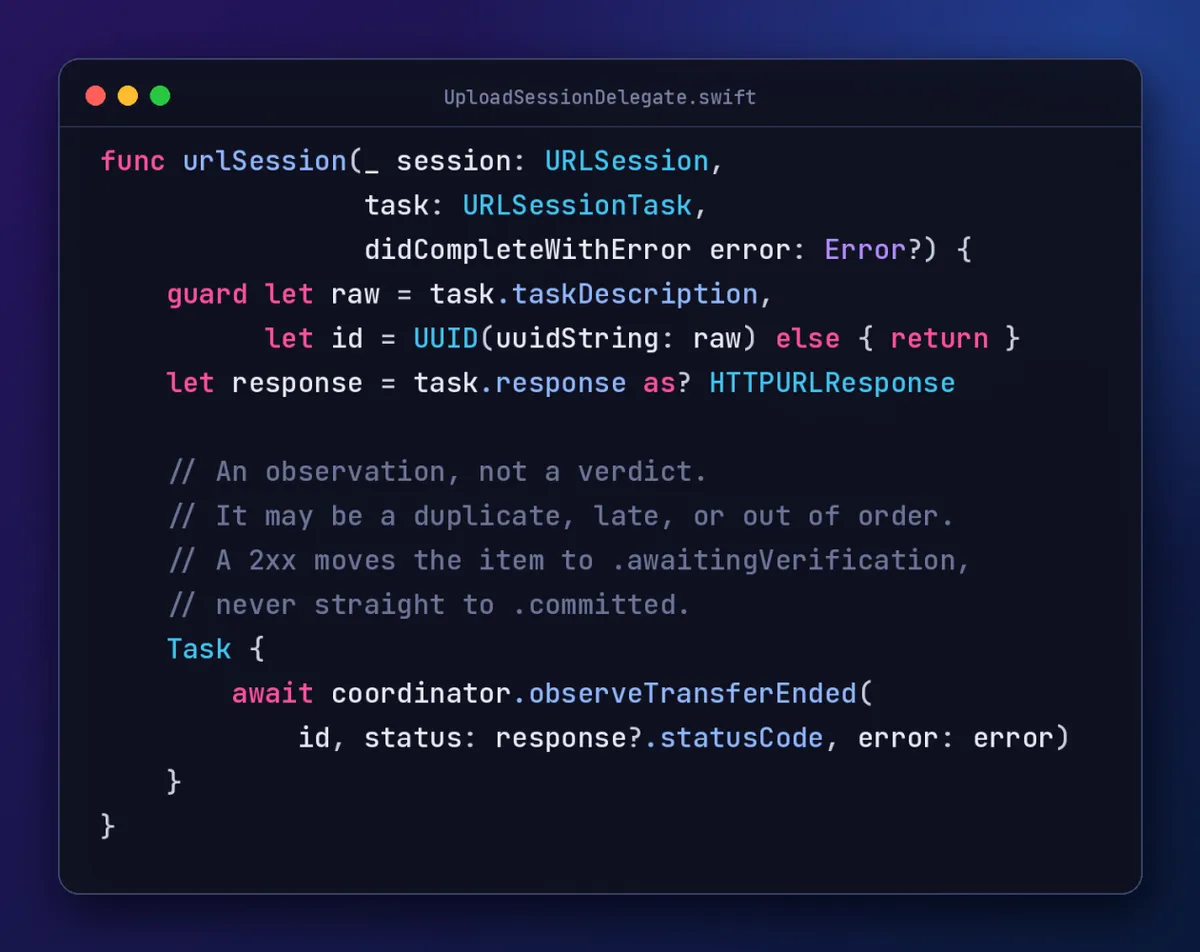
A background relaunch has its own contract. When iOS wakes your app to deliver session events, three things must happen, in this order:
- Keep the completion handler that arrives in application(_:handleEventsForBackgroundURLSession:completionHandler:).
- Recreate the session with the same identifier, so the pending events have somewhere to land.
- Call the handler only from urlSessionDidFinishEvents(forBackgroundURLSession:), once every observation has reached the ledger. That call tells iOS it can snapshot your updated UI.
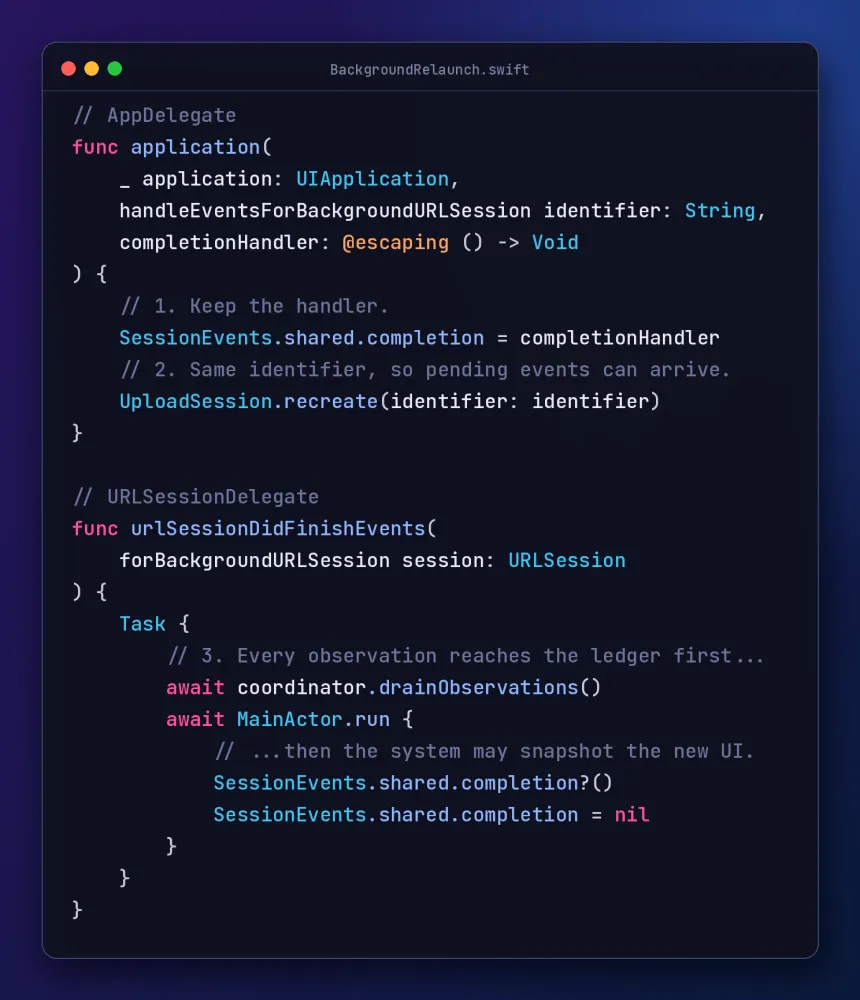
Reconciliation Is Where Durable Work Finishes
On every launch, compare what the system still owns with what the ledger says is pending, and ask the server about everything else:
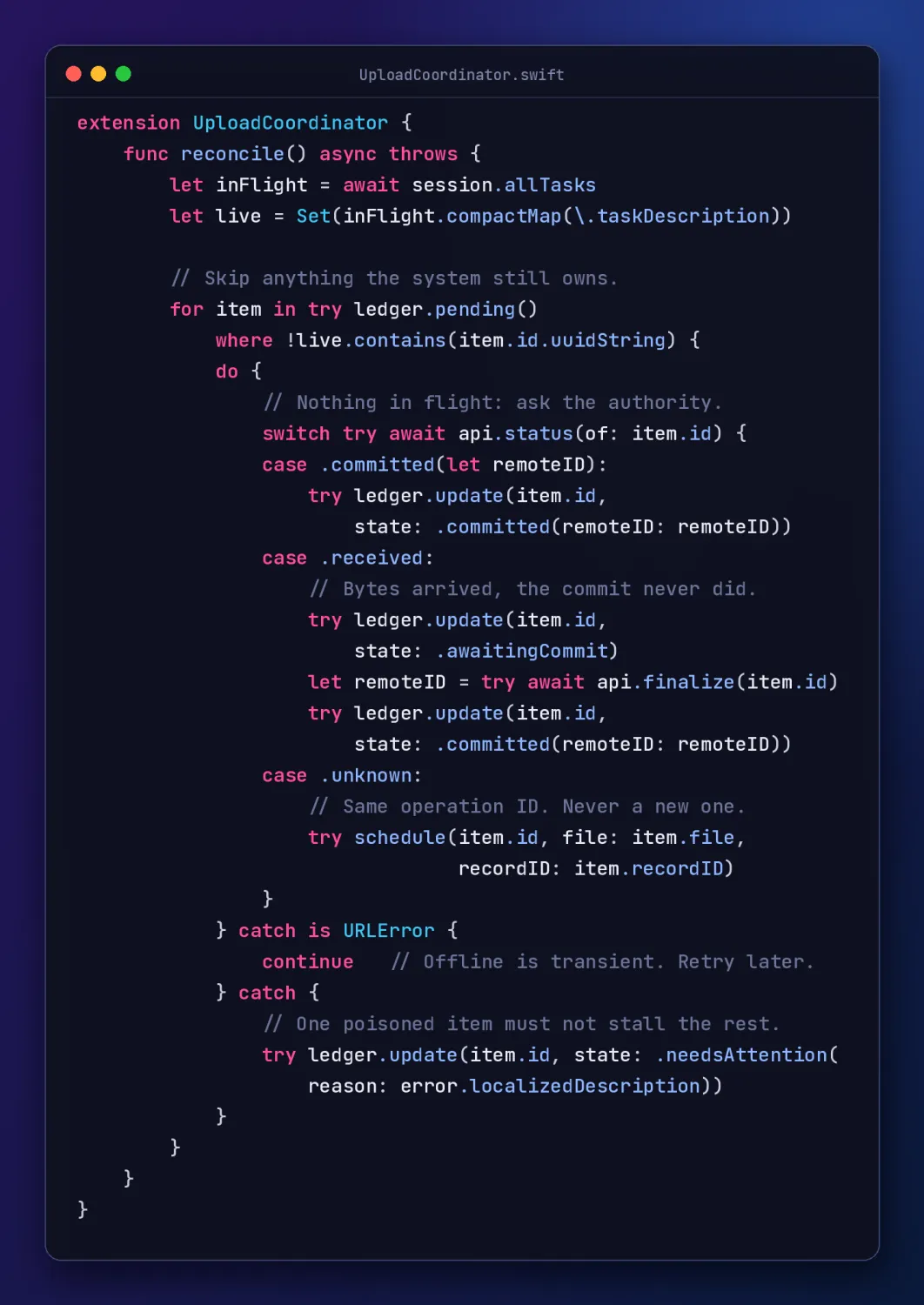
This is the code that would have saved the inspector's video. The server reports received, the client finalizes with the same operation ID, and the ledger records the commit.
Two details separate this from a demo:
- Failure is per item. A missing file or a revoked record moves one item to needsAttention. It never aborts the loop for everything queued behind it.
- Offline is not failure. A URLError means try again later, not tell the user something broke.
The reentrancy warning from Edition #15 applies here too. Every await in reconcile() is a suspension point where a delegate observation can land. Make every ledger transition conditional on the state you expect, never a blind overwrite.
The Hardest Response Is No Response
Now flip the failure. The server commits the video, and the connection drops before the client hears back.
Should the client retry?
Yes. But it retries the same logical operation. It does not create a second attachment.
That is why every request carries the attachment ID as an Idempotency-Key. The server enforces it within the authenticated tenant and record scope, and a retry gets back the existing result or the current status. Never a duplicate.
At-least-once delivery plus idempotent effects gives you effectively-once behavior. An unconditional promise of exactly-once networking is a red flag in any design review.
Chunking adds another layer. Every chunk needs an index or byte range and its own integrity check. Finalization verifies the assembled object, then binds it atomically to the domain record. A checksum catches corruption. It is not authentication, and it never replaces TLS or authorization.
Security Is Part of the Recovery Design
A durable queue holds the most sensitive data in the workflow: photos, video, audio, location, unpublished findings. Protect it at rest, keep retention bounded, and delete it after verified commitment.
File protection is where security meets reliability. With complete protection, a queued file becomes unreadable shortly after the device locks, and the background upload fails. completeUntilFirstUserAuthentication is the usual trade-off, and the one the enqueue code uses.
Credentials age inside the queue. A background task keeps the headers it was created with, so a bearer token can expire before the transfer runs. Use single-object, pre-authorized upload URLs whose expiry still outlives a deferred transfer, and do the real authorization at finalization. Never store bearer tokens in plain text next to the queue.
Then decide what sign-out, an account switch, or lost access to the record does to work already queued. Upload ownership is a security boundary, not a scheduling detail.
Test the Moments Your Happy Path Cannot See
The tests that matter interrupt the workflow at every boundary:
- Terminate the process after persisting the queue item but before scheduling the transfer.
- Lose connectivity after the server commits but before the client sees the response.
- Deliver duplicate, late, and out-of-order completion callbacks.
- Resume with an expired credential or revoked authorization.
- Reconcile a local file that storage cleanup has removed.
- Retry finalization concurrently from two devices.
- Confirm that VoiceOver distinguishes local from remote completion without relying on color or animation.
Unit-test the transitions. Integration-test idempotency on the server. Run interruption tests on real devices. A green simulator suite proves nothing about background transfers.
What Should the App Say?
Not Upload complete because a progress callback reached 100%. Not Failed because an acknowledgement got lost. Say what you can prove:
- Saved locally. The device has a durable copy.
- Sending. The transfer is in progress.
- Verifying. The server has the data, but the record is not yet confirmed.
- Available everywhere. The server confirms the attachment is committed where it belongs.
- Needs attention. Automatic recovery cannot safely continue. Explain why, accessibly, and offer a next action.
The copy is a product decision. The principle is not:
Never turn uncertainty into false certainty.
A Master-Level Review Checklist
When you review upload code, don't stop at "Does it retry?" Ask:
- What does done mean, and which system can prove it?
- Is the intent durable before the first byte is sent?
- What happens if the process dies between any two lines?
- Can every callback arrive twice, late, or out of order without harm?
- Does a retry reuse the operation ID, or create new work?
- Who finishes an upload whose bytes arrived but whose commit never did?
- Can one poisoned item stall the queue?
- What happens on sign-out, an account switch, or lost access?
- Does the UI ever claim more than the evidence supports?
☕ Found this checklist useful?
Swift in Practice is free and reader-supported. No paywalls, no sponsored opinions. If this edition helped you understand a difficult concept, avoid a bug, or make a better engineering decision, you can support the next one:
Final Thought
Reliable offline-first systems are not built by adding retries to a request.
They are built by defining a durable unit of product work, making every transition observable, and reconciling uncertainty against an authoritative source.
Built that way, the inspector's iPhone would have said Verifying, not Uploaded. On the next launch, reconciliation would have found bytes without a commit and finalized them. Her iPad would have shown the video.
The progress bar can finish long before the promise does.
The upload is complete when the product can prove the user's work is where it belongs.
How does your app tell users the difference between saved and synced? Tell me in the comments.
Swift in Practice — engineering Swift beyond syntax. ☕ Buy Me a Coffee
Originally published as a Swift in Practice edition on LinkedIn. Comments and discussion happen there.